How important it is to use properties files in our projects?

I am a java full-stack web application developer.
Prerequisites: Core Java, Oops concepts(Classes and Objects), and about InputStreams
What is a properties file?
A properties file is a file in which we store the data in the form of key-value pair. for every key, there must be a value associated with it. we store only those data in properties files which keeps on changing repeatedly.
This file uses the extension .properties for every file.
why properties files are used?
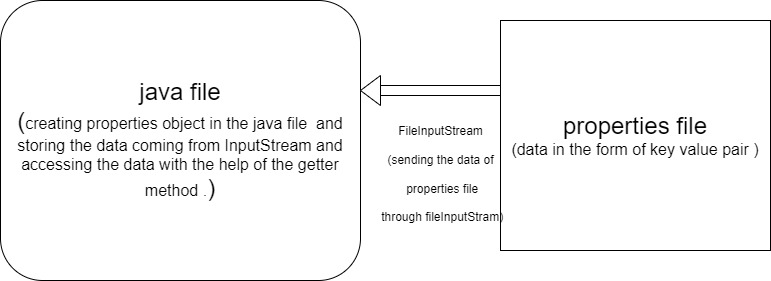
Suppose, we have a program running for any business and in that program, we require some data which keeps on changing day to day basis, so if we have to make changes in that program, first we have to stop the program, make changes in the source code and again execute the program. This process will not yield the ideal performance for the business. It will lead to poor performance issues in the program as it requires more time and money. It is not a lightweight process. And thus directly affect the business. So the ideal solution is that we create a properties file and load it in our source code through FileInputStream and by creating an object of properties file to store the data coming from that input Stream.
The biggest advantage of using properties files is, we don't have to compile that file every time when we make any changes to them .
Note: Properties is a predefined class in java.util package through which we make a properties object in our java file.
Steps to follow while using the properties file in our program.
Create a properties file (make any text file with .properties extension ).
Store the key-value pair in the form of a String.
create an input Stream object through which the data can travel from one file to another. (FIleInputStream) and give the location of that properties file in the form of a String as a parameter.
Now create a properties object and store the data which comes through inputStream.
Now, retrieve the value for each key with the help of the getter method.
Learning through practice :
I have created a java file and a properties file. In my properties file, I have given my URL, username, and password for MySQL workbench. And when I need to change my database to Oracle or MariaDB or any other database, I can change it directly in the properties file without halting the execution of our main program.
Let's see how I connect my database with the java application through the properties file : properties file:
url=jdbc:mysql:///juniorg
username=root
password=Lumia@540
java file:
package in.ineuron.utility;

import java.io.FileInputStream;
import java.io.IOException;
import java.sql.Connection;
import java.sql.DriverManager;
import java.sql.ResultSet;
import java.sql.SQLException;
import java.sql.Statement;
import java.util.Properties;

public class jdbcUtility {

    //private constructor ko bana rahe hain taaki koi is class ka object bana ke iske method ko call nahi kar sake .
        private jdbcUtility(){}

        public static Connection jdbcGetConnection() throws IOException, SQLException
        {

            //connecting the application properties file with the java utility file
            FileInputStream fis=new FileInputStream("E:\\Java_Programs_Eclipse\\DateOperationApp\\src\\in\\ineuron\\properties\\application.properties");
            Properties properties=new Properties();
            properties.load(fis);

            //establishing the connection
            System.out.println("establishing jdbc connection ");
            Connection connection =DriverManager.getConnection(properties.getProperty("url"),properties.getProperty("username"),properties.getProperty("password"));
            return connection;
        }


        //method to clean up the resources
        public static  void CleanUp(Connection connection,Statement statement,ResultSet resultSet) throws SQLException
        {
            if (connection!=null)
            {
                connection.close();
            }
            if(statement!=null) {
                statement.close();
            }
            if(resultSet!=null) {
        resultSet.close();
            }


        }
}
Note: Please write code yourself for better understanding.And Subscribe to my newsletter for more such articles.


